Most project tools store dates. This one computes them.
A real Critical Path Method engine with Monte Carlo risk analysis — the math that costs five figures everywhere else, free and open source. Don't take that on faith: the engine is a separate Python package. Verify it in sixty seconds, no signup, no Docker.
Every project tool claims its scheduling is real. TruePPM's engine is a separate Apache-2.0 Python package — the same code the platform runs on, versioned in lockstep. No server, no database, no account. As far as we know, no other PPM tool, open or commercial, lets you audit its scheduling engine on its own.
# no signup, no Docker, no accountpip install trueppm-schedulerfrom trueppm_scheduler import schedule, Project, Task, Dependency result = schedule(Project( id="p-1", name="Verify me", start_date=date(2026, 1, 5), tasks=[ Task(id="design", duration=timedelta(days=5)), Task(id="build", duration=timedelta(days=10)), Task(id="docs", duration=timedelta(days=3)), ], dependencies=[Dependency("design", "build")], )) result.critical_path # ['design', 'build']build.early_finish # 2026-01-23docs.total_float # 12 days
Fifteen working days across two weekends, computed on a calendar — not counted in raw days
All four dependency types (FS/SS/FF/SF) with calendar-aware lag
Multi-calendar composition, cycle detection that names the offending path
Monte Carlo with per-task sensitivity — which tasks actually move the date
A Rust/WASM twin held in CI conformance against the Python engine
Diff it against MS Project if you like. That is the point of shipping it separately — the claim is falsifiable, which is the only kind worth making about scheduling math.
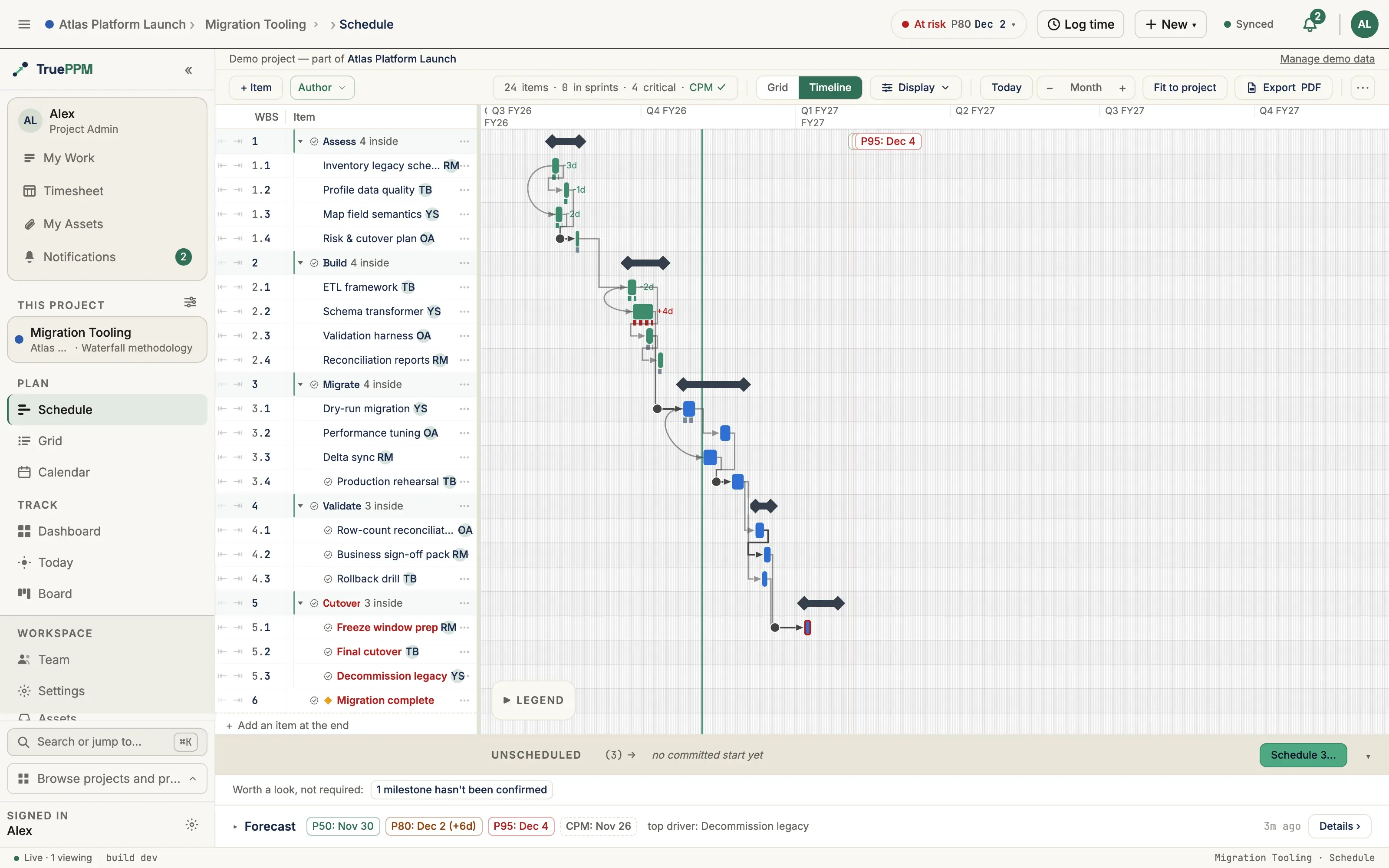
Most tools force the call. TruePPM keeps one underlying model — tasks, dependencies, dates — and lets each team work the way it works. Plan a board, derive a schedule. Move a bar, the backlog updates. Same truth, two surfaces.
Agilecyclic · iterative · continuous
Waterfalllinear · deterministic · scheduled
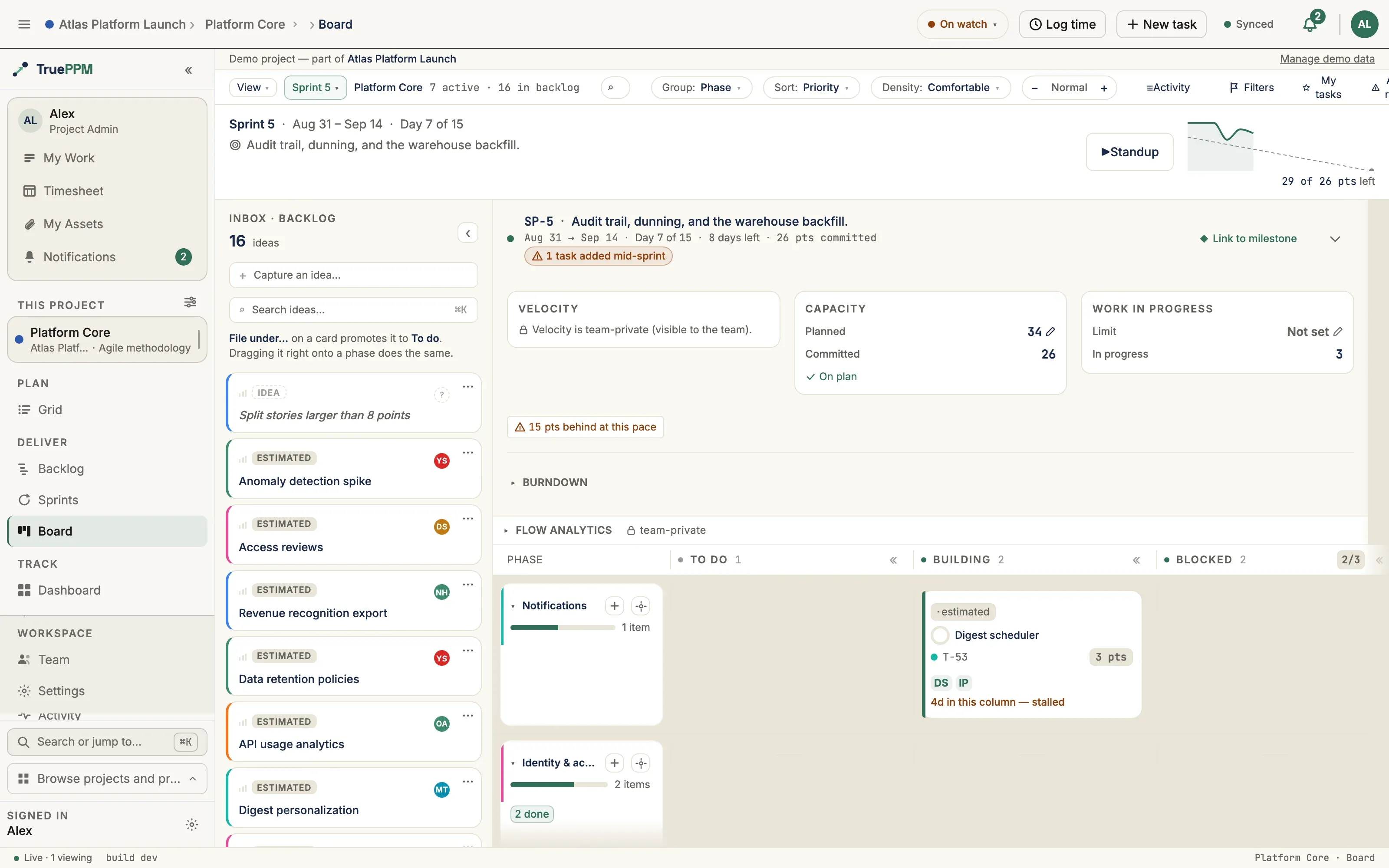
same program · one task model · both screenshots from the bundled Atlas sample
01 · ONE MODEL
Cards and bars are the same task. Estimate in points, schedule in days — TruePPM keeps both in step.
02 · TWO-WAY
Close a sprint and the schedule advances. Push a bar and the backlog reorders. No copy-paste status meetings.
03 · PER-TEAM
Software runs the board, hardware runs the Gantt, the PMO reads the rollup. Nobody is forced off their method.
Probabilistic forecasting (Monte Carlo)
Everywhere else, this is a second product.
Single-point dates lie. Monte Carlo simulation samples thousands of possible runs across your estimates, dependencies, and risk ranges and hands you a distribution — so you commit to a date you're 80% likely to hit instead of a hope.
Across the commercial field that capability is licensed separately and operates on a schedule exported out of your scheduling tool: Deltek Acumen Risk, Barbecana Full Monte, Safran Risk, Oracle Primavera Risk Analysis. In open source it is simply absent — we are not aware of another OSS project-management platform that ships it at all.
TruePPM computes it in the same engine that computes the dates. No export step, no second license, no add-on tier.
Per-task duration ranges, not fake precision
P50 / P80 / P95 — the dates you're 50, 80, and 95% likely to hit
Sensitivity: which tasks actually move the date
In the Apache-2.0 core — and in the standalone engine package
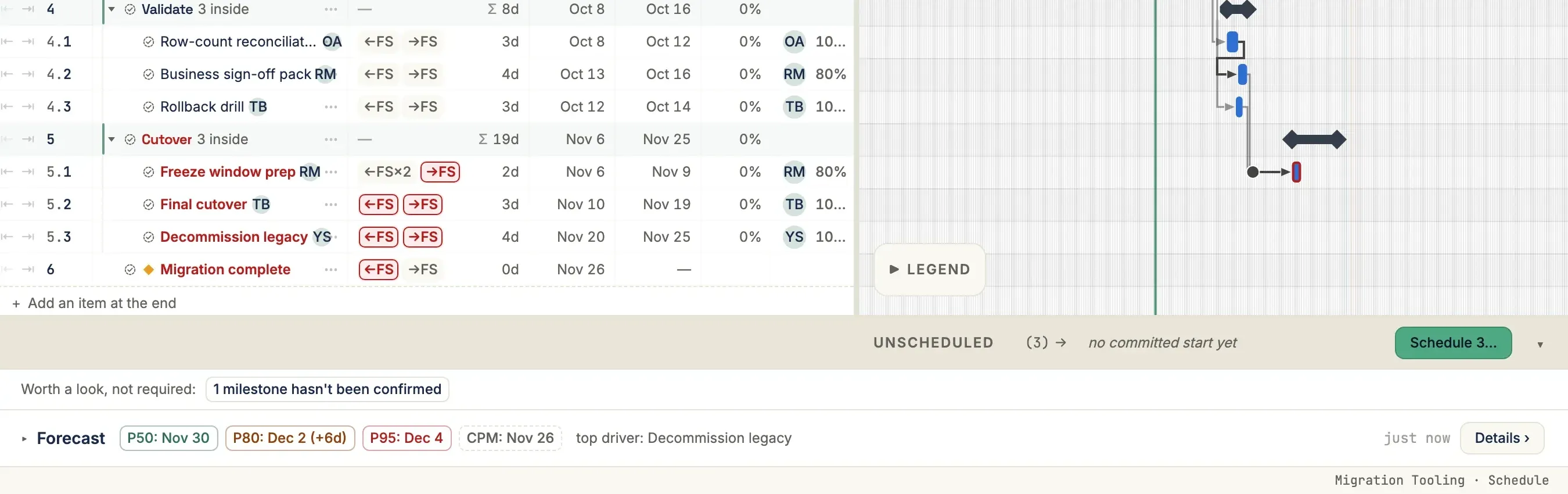
Forecast bar on the Migration Tooling project · P50 / P80 / P95 next to the deterministic CPM date, with the task that moves it most
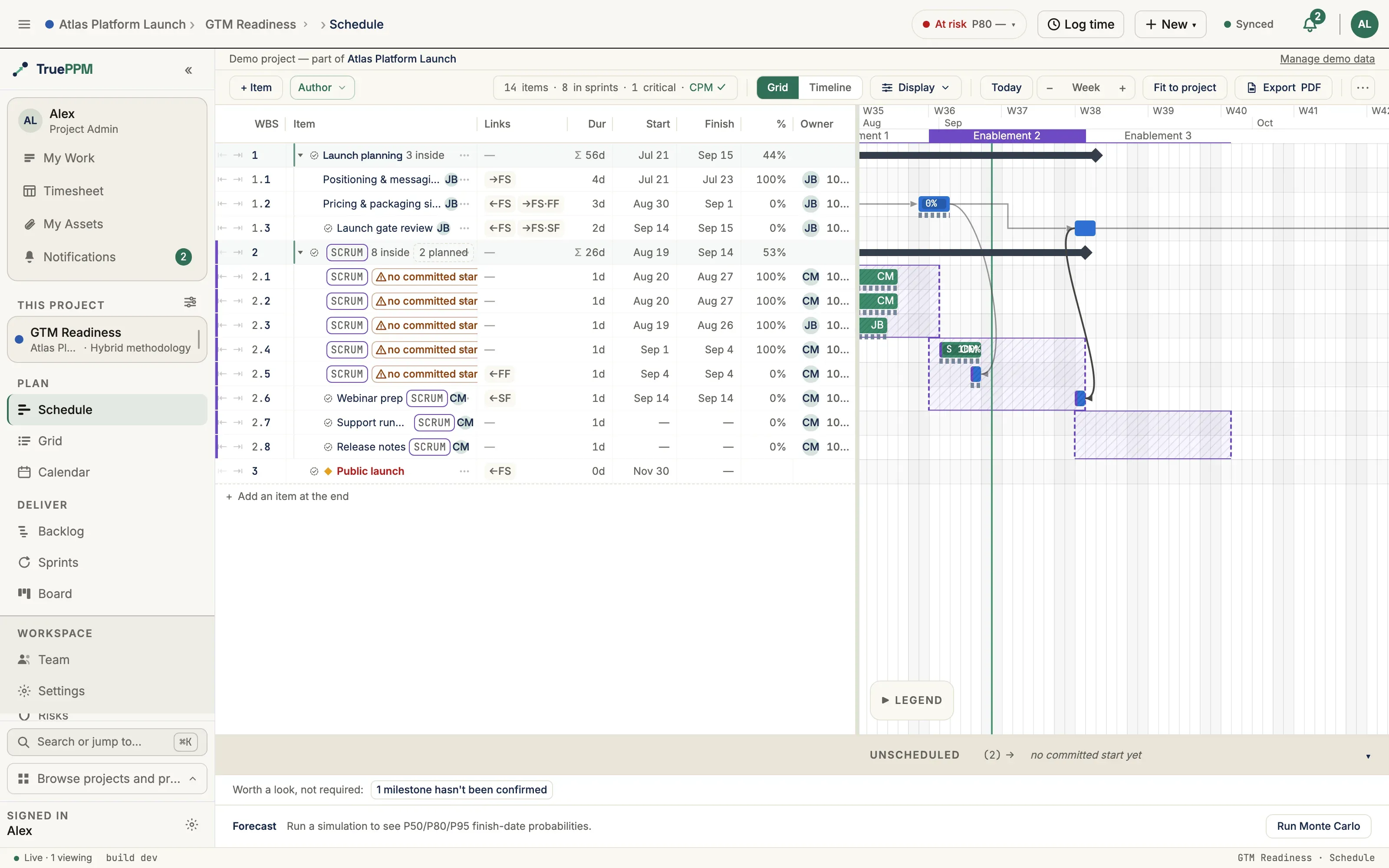
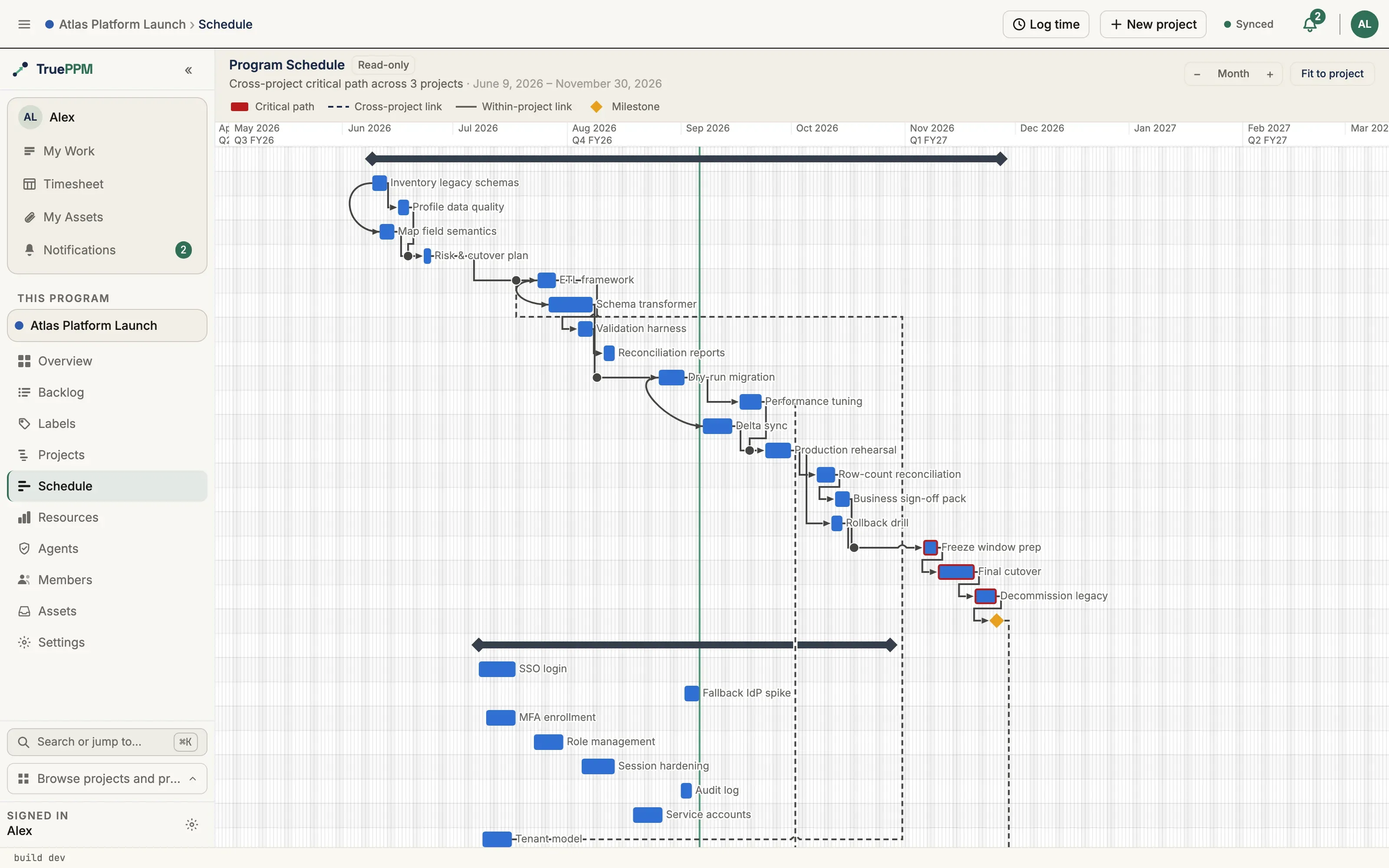
Program schedule · the critical path computed across three projects, cross-project links dashed
Critical-path engine
Know exactly what's holding the date.
A real Critical Path Method (CPM) engine computes the longest path, the slack (its formal name is float) on every task, and the knock-on effect of any change — in milliseconds, as you type. Slip a critical task and the whole network recomputes. Tasks with slack stay quiet.
6
tasks on the critical path
0d
float before the date slips
4
dependency types, calendar-aware lag
∞
cross-team dependencies
Resource leveling — automatically resolving an over-allocation — is a different thing, and TruePPM does not do it yet. What it doesn't do →
In the 0.4 beta
Computed, not guessed.
Point any AI client that speaks MCP — Claude Desktop, Cursor, Zed — at your self-hosted instance and ask the live schedule real questions: the critical path, sprint status, or a what-if like "slip this task three days — when do we ship?" Every answer is computed server-side by the same CPM and Monte Carlo engine the UI uses — never a language model's guess, and it never leaves your box. That's one principle with four parts: an agent can compute an answer, cite its derivation, be refused when a change would break the plan, and reproduce any answer later — the same rules for a human and an agent, so the schedule an agent can read and act on is one it can't corrupt.
Compute & cite — answers come from the engine, each with the derivation to back it
Refuse — a change that breaks the plan's rules is rejected the same for a human or an agent
Reproduce — every answer and refusal is recorded in a tamper-evident log you can replay
The read surface and the agent-action audit log ship in the 0.4 beta. Plan mode — an agent proposes a change and gets the verdict and impact back, with nothing committed — follows in 0.5, and committing agent writes in 0.6. How grounding works →
# any MCP client, pointed at your own instance› what's holding the Aug 21 date? critical_path: pour → steel → fit-out float: 0d · p80: 2026-08-21› slip "foundation pour" 3 days — when do we ship? p50: Aug 19 · p80: Aug 26(what-if · plan untouched)# computed by the scheduling engine — nothing guessed
Project → Program, in the open core
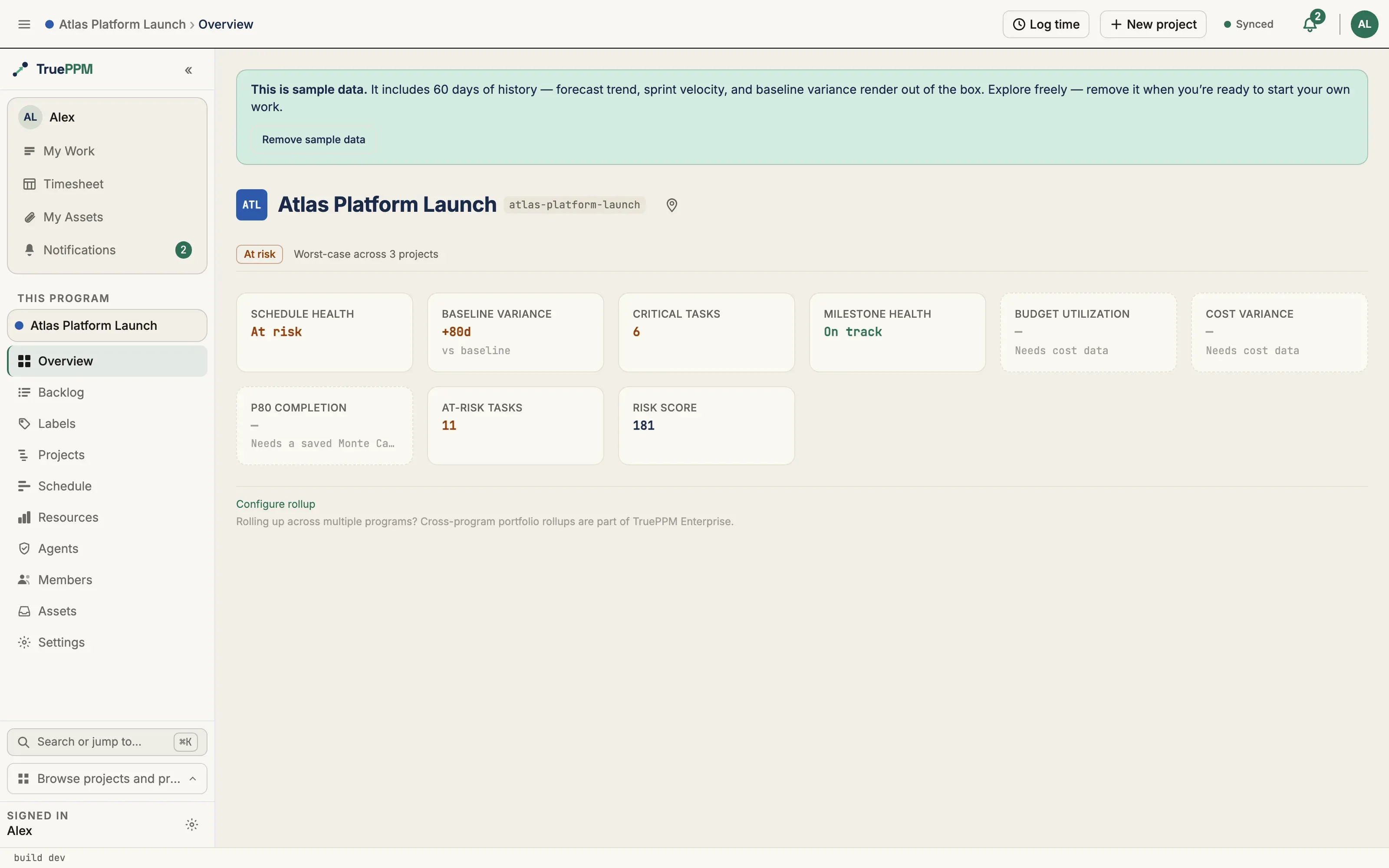
One number rolls all the way up.
Every task feeds its program — health, variance, and forecast aggregate automatically, so the program manager and the team read the same truth at different altitudes. Program rollup is part of the free, open-source core. Roll many programs into a governed portfolio with the Enterprise edition.
Program overview · every tile is computed from the projects beneath it; portfolio rollup across programs is the Enterprise layer
Open core · self-hostable
No SSO tax. No seat count.
The core is Apache-2.0 and runs anywhere — your private cloud, your cluster, your laptop. Bring your own Postgres, point it at your own identity provider, keep your schedule data inside your perimeter. API-first: if it isn't in the API, it doesn't exist.
# clone & start the full stackgit clone https://gitlab.com/trueppm/trueppmcd trueppm && docker compose up -d# forecast a project from the CLIcurl -s -X POST ppm.internal/api/v1/projects/$ID/monte-carlo/ \ -H "authorization: Bearer $TOKEN" | jq '{p50, p80, cpm_finish}'{"p50": "2026-08-14","p80": "2026-08-21","cpm_finish": "2026-08-07"}
01 · CLONE & RUN
One command, batteries included
Postgres 16 and Valkey come bundled — no separate database, cache or .env setup required to get running.
02 · SEED
Load a real program, or start blank
One command loads a populated sample program with persona logins so you can explore a schedule in flight — or skip it and build your own from scratch.
03 · CONNECT
Wire up sign-on, invite your team
Point it at your own identity provider from the admin UI and invite your team. No redeploy.
Integrations
Wired into where work already happens.
Schedules don't live in a vacuum. TruePPM round-trips MS Project files, links commits to tasks, fires webhooks on state changes, and sends the digest your stakeholders actually read.
MS Project & Jira
Import and export MS Project schedules — full round trip, in the UI or over the API. A personal, read-only Jira sync into My Work is in the 0.4 beta, so a team can adopt TruePPM without switching first.
Git workflows
Reference a task in a branch or PR and TruePPM moves the card, logs effort, and updates the schedule on merge.
Email digests
Daily and weekly rollups per audience — the contributor sees their tasks, the executive sees variance and the forecast date.
Webhooks & API
Subscribe to any state change. Real-time webhooks (automated callbacks) drive your CI, status pages, and incident tooling.
Straight answers
What it doesn't do.
Most tool sites make you find this out forty minutes into an evaluation. Here it is up front, so you can disqualify us in five. This list is maintained — every gap names the release it's planned for, or says plainly that it isn't.
No resource leveling
The engine computes the schedule; it will not resolve an over-allocation for you. Allocation with over-allocation warnings lands in 0.5. If you need automatic leveling today, use P6 or MS Project. This is the largest gap between TruePPM and the traditional schedulers.
One constraint type
Start-no-earlier-than, and that's it. No must-finish-on, no deadlines. MS Project ships eight constraint types. If your schedules are contractual, TruePPM can't express them yet.
No cost or earned value
No rates, no budgets, no EVM today. A labor cost model — budgets, rates, and a P80 cost beside the P80 date — is planned for 0.5; EV-lite (SPI/CPI) for 0.8. If the first question your PMO asks is "what's the CPI?", we're not ready for you.
A measured ceiling
Roughly 1,000 tasks stays comfortable in the Schedule view — bounded by the browser, not the engine. Measured on documented hardware, published with what we didn't test. P6 handles two orders of magnitude more.
No mobile app
The web UI is responsive, but there's no installable app yet. An installable PWA with an offline shell lands in 0.5, and it is the mobile story through 1.0 — no native Android or iOS app is scheduled.
We're young
First release May 2026, and TruePPM is built part-time. 0.4, the current line, is the first beta. OpenProject has fifteen years, full-time staff, and a support contract. What we offer against that is a public commit history, a roadmap that publishes its dates at honest precision, and this page.
Verify the engine, then decide whether to run the platform. Apache 2.0, no seat count, no feature flags, no telemetry — on your infrastructure, with your data.